API Key Authentication for MCP
By default, a DreamFactory MCP endpoint authenticates clients with OAuth 2.0: the client completes a browser login, obtains a token, and every request carries an Authorization: Bearer header. From DreamFactory 7.7.1, each MCP service can additionally accept a static DreamFactory API key. The setting is a per-service opt-in and is off by default — services that never enable it behave exactly as before.
API keys suit headless and server-to-server MCP clients that cannot complete a browser OAuth flow: CI jobs, backend agents, scheduled scripts, or plain curl.
Quick Reference
| Property | Value |
|---|---|
| Setting | Allow API Key Authentication toggle in Advanced Options (allow_api_key_auth) |
| Default | Off — OAuth remains the only mechanism until an admin enables it |
| Header | X-DreamFactory-API-Key |
| Key | A standard DreamFactory app API key (64-character hex) |
| Requirements | The key's app must be active and have a role assigned |
| Access scope | The app's role, intersected with the service's Exposed Services |
| Precedence | An Authorization: Bearer header always wins and takes the OAuth path |
| Optional layering | X-DreamFactory-Session-Token adds user identity on top of the key |
Enabling it
Log in as an administrator, open the AI tab, click MCP, and select your MCP service. Under Advanced Options, switch on Allow API Key Authentication and save:
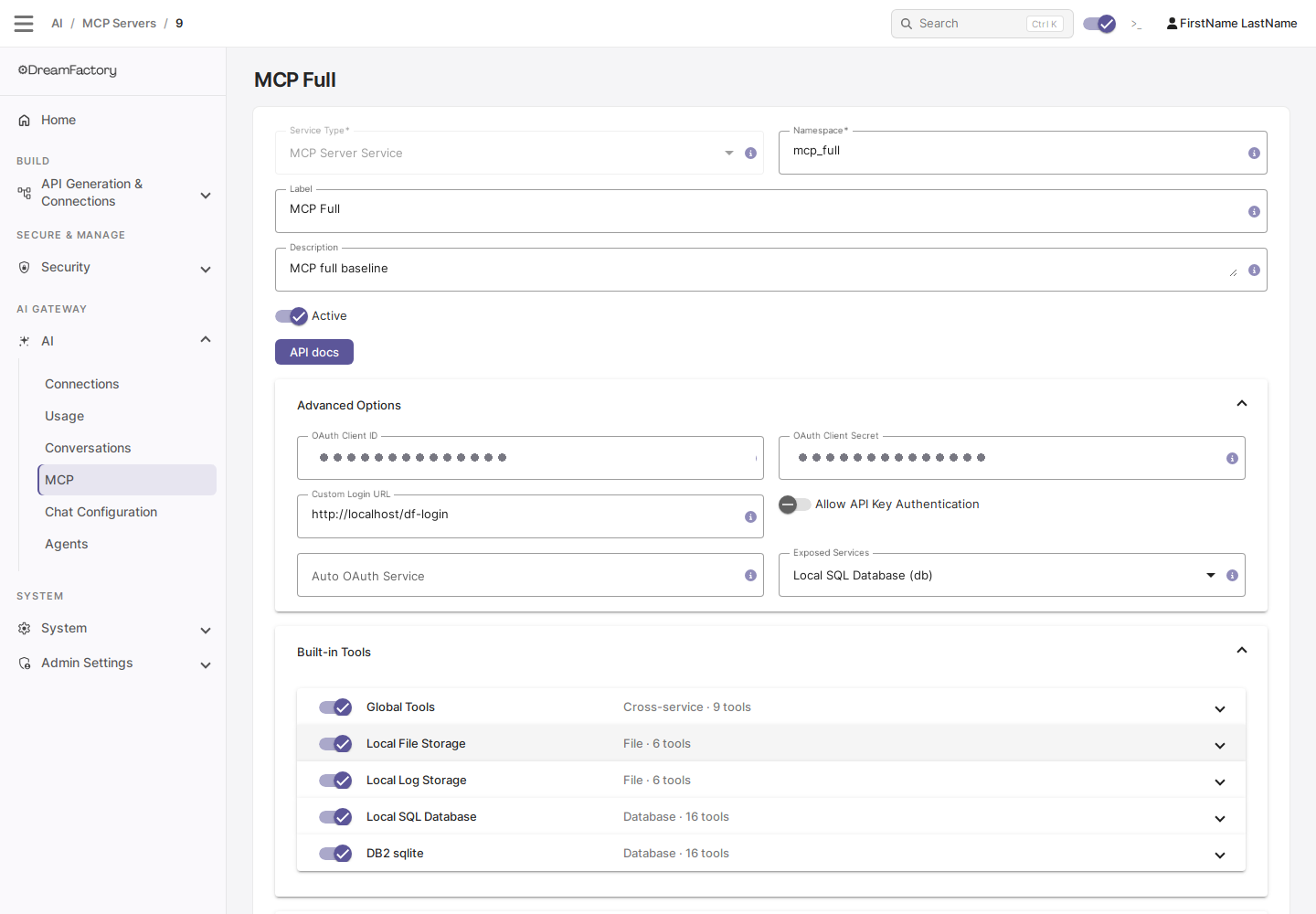
The key you hand to clients is an ordinary DreamFactory application API key. For MCP the key's app must be active and must have a role assigned — keys whose app has no role are rejected, because that role is what scopes every tool call.
Making requests
Send the key in the X-DreamFactory-API-Key header on every request. Initialize as usual:
curl -i -X POST https://your-dreamfactory-host/mcp/{service-name} \
  -H "Content-Type: application/json" \
  -H "X-DreamFactory-API-Key: YOUR_APP_API_KEY" \
  -d '{
    "jsonrpc": "2.0",
    "id": 1,
    "method": "initialize",
    "params": {
      "protocolVersion": "2025-03-26",
      "capabilities": {},
      "clientInfo": {"name": "my-client", "version": "1.0.0"}
    }
  }'
The response includes an MCP-Session-Id header. Include it — together with the API key header — on subsequent calls:
curl -X POST https://your-dreamfactory-host/mcp/{service-name} \
  -H "Content-Type: application/json" \
  -H "MCP-Session-Id: YOUR_SESSION_ID" \
  -H "X-DreamFactory-API-Key: YOUR_APP_API_KEY" \
  -d '{
    "jsonrpc": "2.0",
    "id": 2,
    "method": "tools/call",
    "params": {"name": "list_apis", "arguments": {}}
  }'
How access is scoped
- Key-only requests run under the key app's role — the same way API-key-only calls to the REST API are authorized. The tool catalog the session sees is the intersection of that role's service access and the MCP service's Exposed Services list.
- Bearer always wins. A request carrying an
Authorization: Bearerheader goes through the unchanged OAuth path, regardless of any API-key headers it also carries. - With the toggle off (the default), requests without a Bearer token receive
401with OAuth discovery info — exactly the behavior on instances prior to 7.7.1.
Layering a session token
Alongside the key, a client may also send a DreamFactory session JWT in the X-DreamFactory-Session-Token header. The request then runs with that user's identity and role mapping on top of the app context — user-specific RBAC wins over the bare app role, matching how the combination behaves against the REST API. An invalid or expired session token is rejected rather than silently ignored.
Security guidance
Once the toggle is on, anyone holding the app's API key can open MCP sessions with that app's role — there is no interactive login in front of it. Distribute keys like passwords, keep them out of source control, and prefer OAuth for interactive clients.
- Scope tightly. Give the app a least-privilege role, and keep the MCP service's Exposed Services list to the backends the key actually needs.
- Revoke deliberately. To cut off access: refresh the app's API key, unassign its role, deactivate the app, or switch Allow API Key Authentication back off for the service.
- Keys stay out of the logs. Keys are format-checked before any lookup, and the key value is not written to DreamFactory's log at the default log level — the auth-success line (visible only at
LOG_LEVEL=debug) records the app, not the key. - Calls are audited. API-key-authenticated tool calls are recorded in the
mcp_request_logaudit table like OAuth calls, attributed to the key's app and role (with no OAuth client).
The toggle also exists on System API MCP Server (system_mcp) services — the config model is shared. Such an endpoint stays OAuth-only until an admin opts it in, and a key-authenticated session's role gates System API calls exactly as it gates them through the REST API.
See also
- Scoping Tools with Exposed Services — what the session's role is intersected with
- MCP Server — request format and required headers
- Creating an MCP Server Service — OAuth setup and the rest of Advanced Options