Scoping Tools with Exposed Services
Starting with DreamFactory 7.7.1, every MCP service carries a per-endpoint allowlist called Exposed Services: the database and file services that endpoint turns into MCP tools. Connecting to /mcp/storefront no longer dumps every other database on the instance into tools/list — each MCP endpoint advertises exactly the backends you attach to it. That keeps AI clients focused on the data they are meant to work with, and keeps unrelated services invisible to them.
Quick Reference
| Property | Value |
|---|---|
| Setting | Exposed Services multi-select in the MCP service's Advanced Options |
| Stores | Database and file service names (exposed_services in the service config) |
| Empty selection | No auto-generated database or file tools — deliberate, never a fallback to "everything" |
| New services | Start with nothing selected — pick at least one service before connecting a client |
| Upgraded services | Backfilled with every database and file service that existed at upgrade time |
| Renames / deletes | Followed automatically — the list is rewritten when a backend is renamed or deleted |
| Instance-wide off switch | MCP_SCOPE_TOOLS=false in .env (restores the legacy instance-wide catalog) |
Selecting services in the admin interface
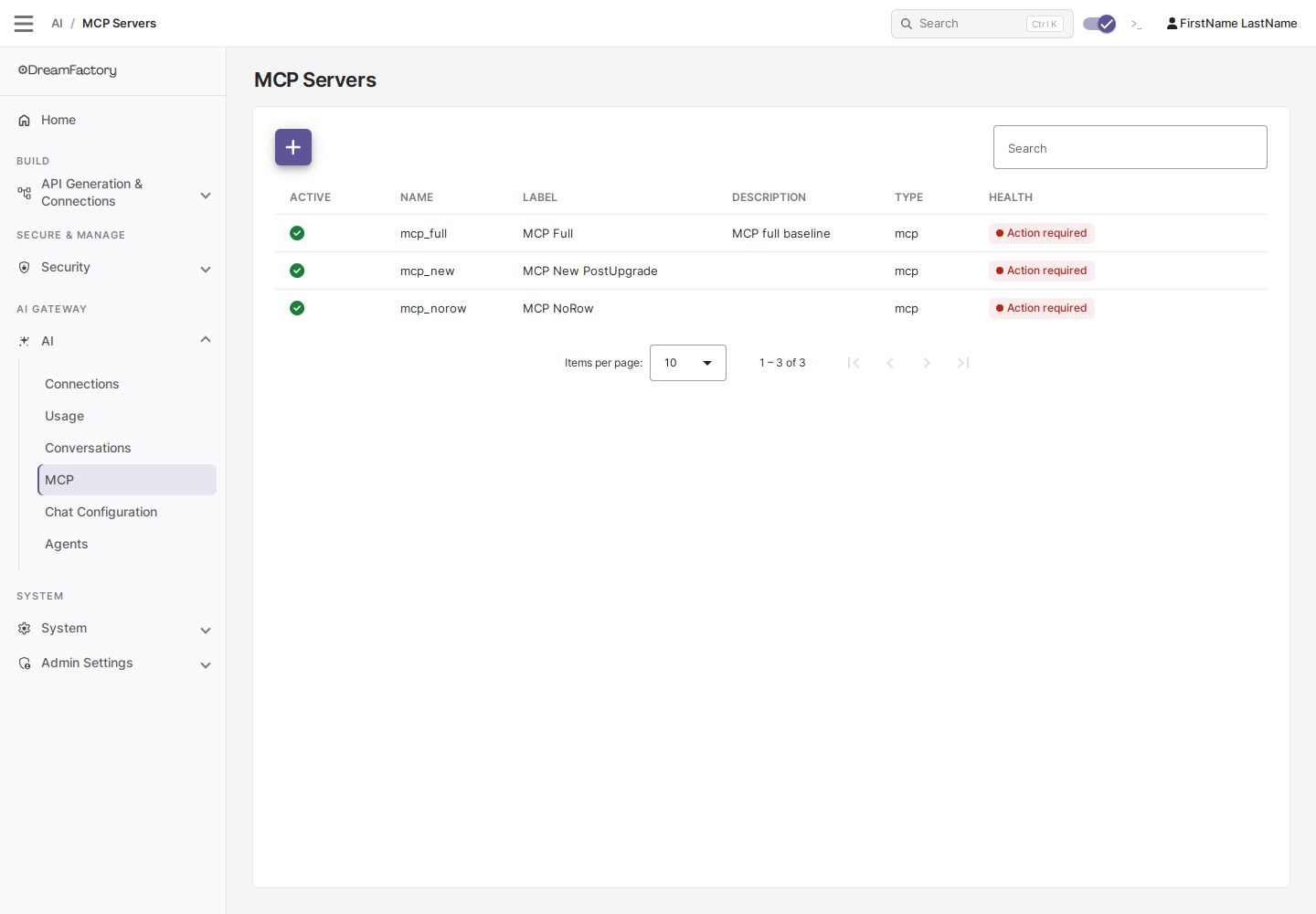
Log in as an administrator, open the AI tab, and click MCP to see your MCP services:
Open the service, scroll to Advanced Options, and use the Exposed Services multi-select to check the database and file services this endpoint should expose. Save when done:
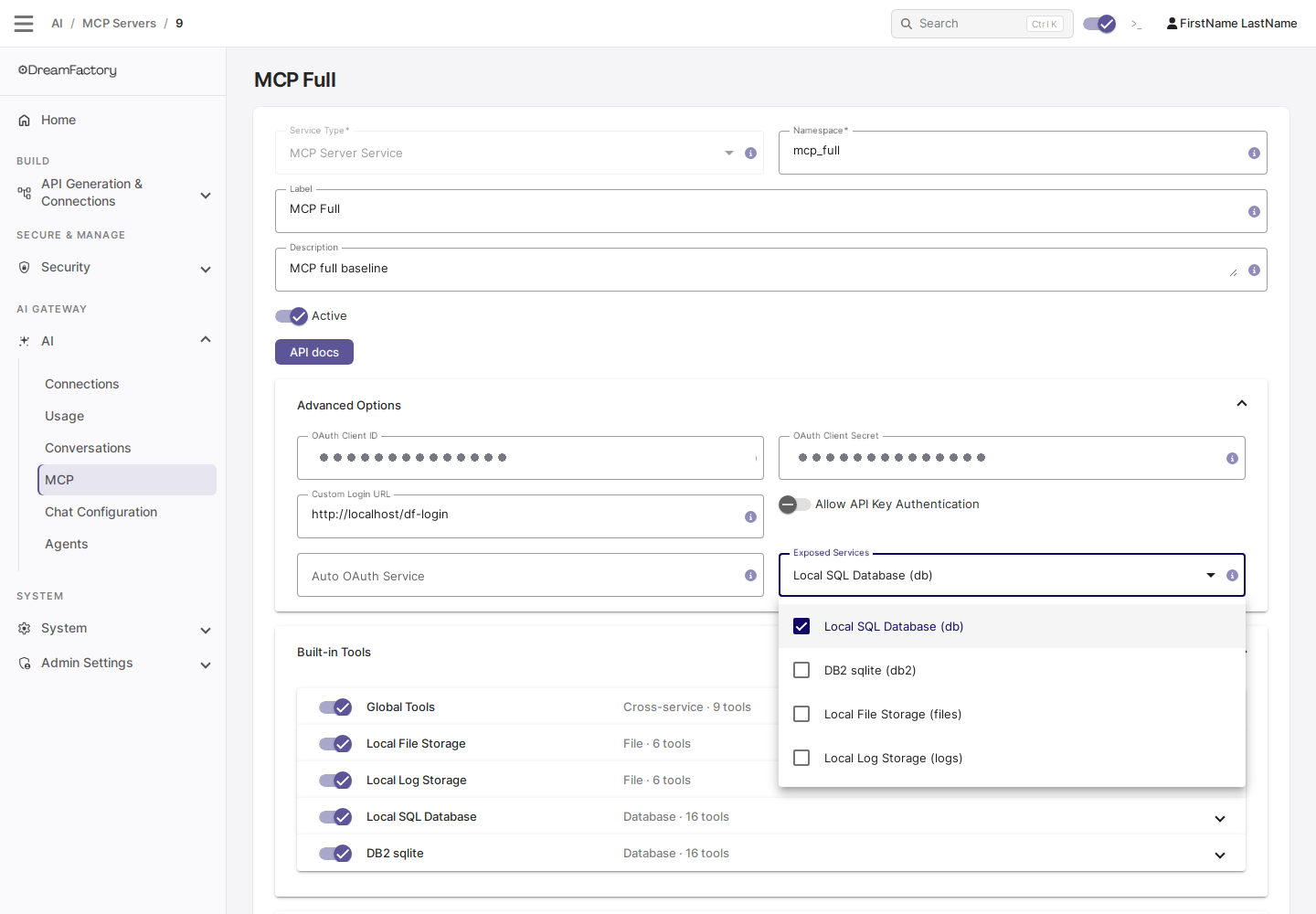
The tool list is fixed for the life of an MCP session — the server never sends tools/list_changed, since that invalidates the client's prompt cache. After changing Exposed Services, reconnect your MCP clients to pick up the new catalog.
Empty means none
An MCP service with no Exposed Services selected serves no auto-generated database or file tools at all — only custom tools, the built-in search/fetch pair, and global tools register. An empty selection does not fall back to every service on the instance.
This is deliberate: a custom-tools-only MCP service is a valid setup, so an empty selection is not a validation error. DreamFactory does log a warning when a service is saved with scoping in effect and nothing selected, so an admin wondering why a client sees no table tools can find the cause in the logs.
Roles still apply
Exposed Services narrows the catalog; it never widens it. The tools a connected client actually receives cover the intersection of the Exposed Services list and the services the authenticated identity's role grants access to — the connecting user's role for OAuth sessions, or the app's role for API-key sessions. Administrators see every exposed service.
scope_tools and MCP_SCOPE_TOOLS
Scoping is on by default. Two switches exist for restoring the pre-7.7.1 instance-wide catalog:
MCP_SCOPE_TOOLS(.env, defaulttrue) — the instance-wide default for MCP services that have not setscope_toolsthemselves.scope_tools(per-service config) — a tri-state override (true/false/ unset). It is intentionally not shown in the admin interface, because a checkbox cannot represent "unset"; set it through the system API if you need a per-service override.
How the pieces combine:
exposed_services | scope_tools | MCP_SCOPE_TOOLS | tools/list contains |
|---|---|---|---|
| Non-empty | any | any | Only the listed services |
| Empty | unset | true (default) | No database/file tools |
| Empty | true | any | No database/file tools |
| Empty | unset | false | Every accessible database/file service (legacy) |
| Empty | false | any | Every accessible database/file service (legacy) |
Turning scoping off (MCP_SCOPE_TOOLS=false or scope_tools=false) only matters for services whose Exposed Services list is empty. A service with services selected is always scoped to that selection, regardless of either flag.
Upgrade behavior
Upgrading to 7.7.1 must not shrink anyone's tool catalog, so the upgrade migration backfills every existing MCP service's Exposed Services with the names of all database and file services that existed at migrate time — including MCP services that were created through the API without any explicit configuration. Their tools/list is unchanged after the upgrade.
The snapshot is frozen at upgrade time. Database or file services you create later are not advertised automatically — open the MCP service and add them to Exposed Services yourself. New MCP services created after the upgrade always start with an empty selection.
Service renames and deletes
Exposed Services stores service names, and from 7.7.1 DreamFactory keeps them in step automatically:
- Renaming a database or file service rewrites the old name to the new one (case-insensitively) in every MCP service's list, so the backend stays exposed under its new name.
- Deleting a service removes its name from every list. A list emptied this way stays empty — it does not fall back to the full catalog — and a service later recreated under the same name does not silently inherit the old exposure.
A failure in this sync is logged as a warning and never blocks the rename or delete itself.
Combining with Built-in Tools
Exposed Services and the per-tool toggles under Built-in Tools are complementary, and they apply in order:
- Exposed Services decides which backends get tools at all.
- Built-in Tools (the
disabled_toolsconfig) then disables individual tools within an exposed service — for example, keepdb_get_table_databut switch offdb_delete_records.
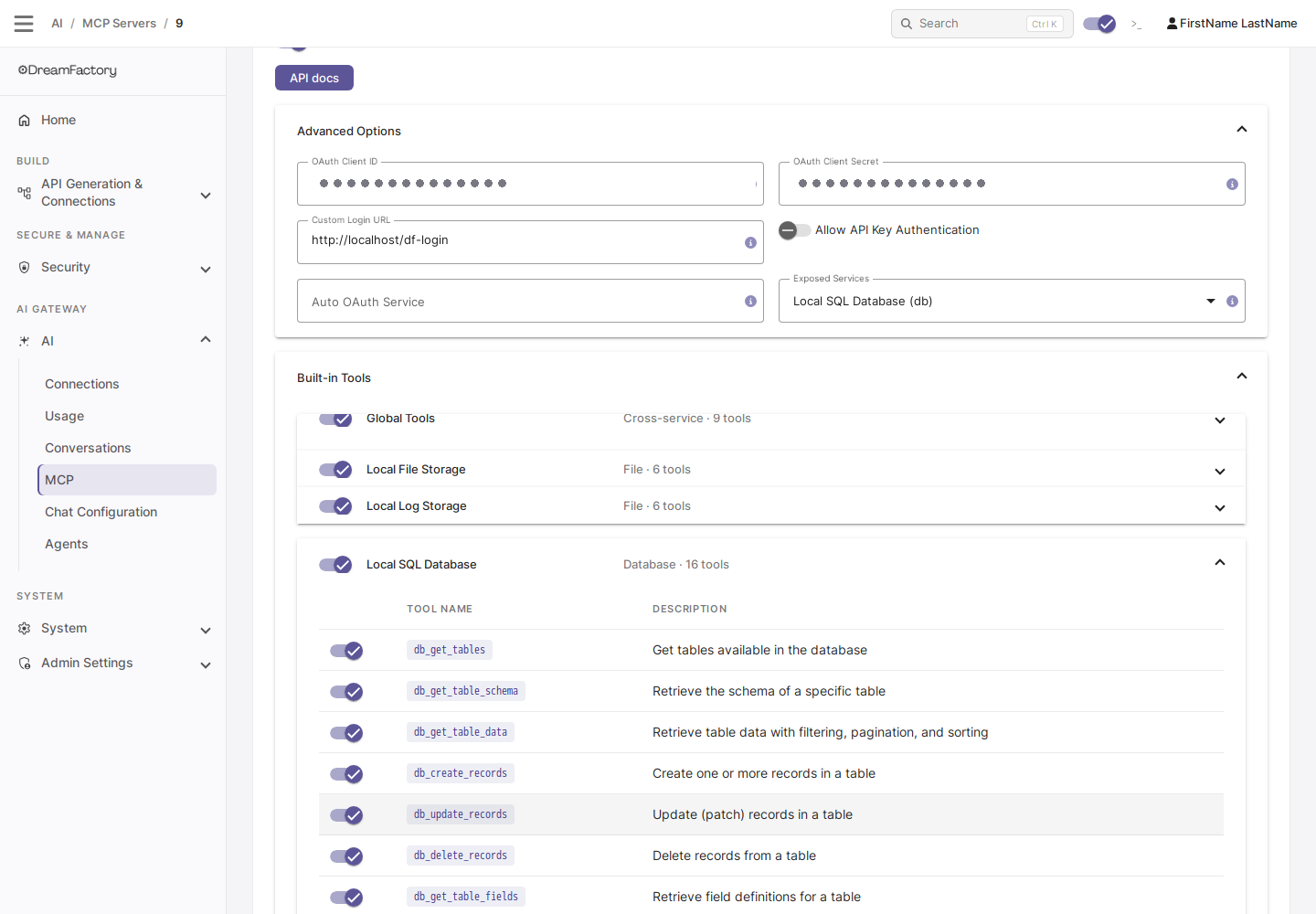
Disabling every tool of a service is not the same as removing the service from Exposed Services — use Exposed Services to take a backend out of the catalog entirely, and Built-in Tools to trim verbs from a backend that stays in.
Leaner tool catalogs
Alongside scoping, 7.7.1 reduces what each advertised tool costs your AI client: tool descriptions are shorter, with query syntax documented once in the server instructions rather than repeated per tool, and the cross-service all_* aggregator tools (such as all_get_tables and all_list_files) only register when two or more services of that category are in the catalog — a single-database endpoint no longer carries cross-database aggregators it cannot use.
Exposed Services applies to the data-plane MCP Server service type. MCP service types that have no database/file tool catalog — such as the System API MCP Server (system_mcp) — hide the picker and ignore exposed_services, scope_tools, and MCP_SCOPE_TOOLS.
See also
- Creating an MCP Server Service — creating the service and the rest of Advanced Options
- API Key Authentication for MCP — how API-key sessions compose with Exposed Services
- Deploying the MCP Server — upgrade notes and the export/import caveat
- Custom MCP Tools — tools that register regardless of Exposed Services